
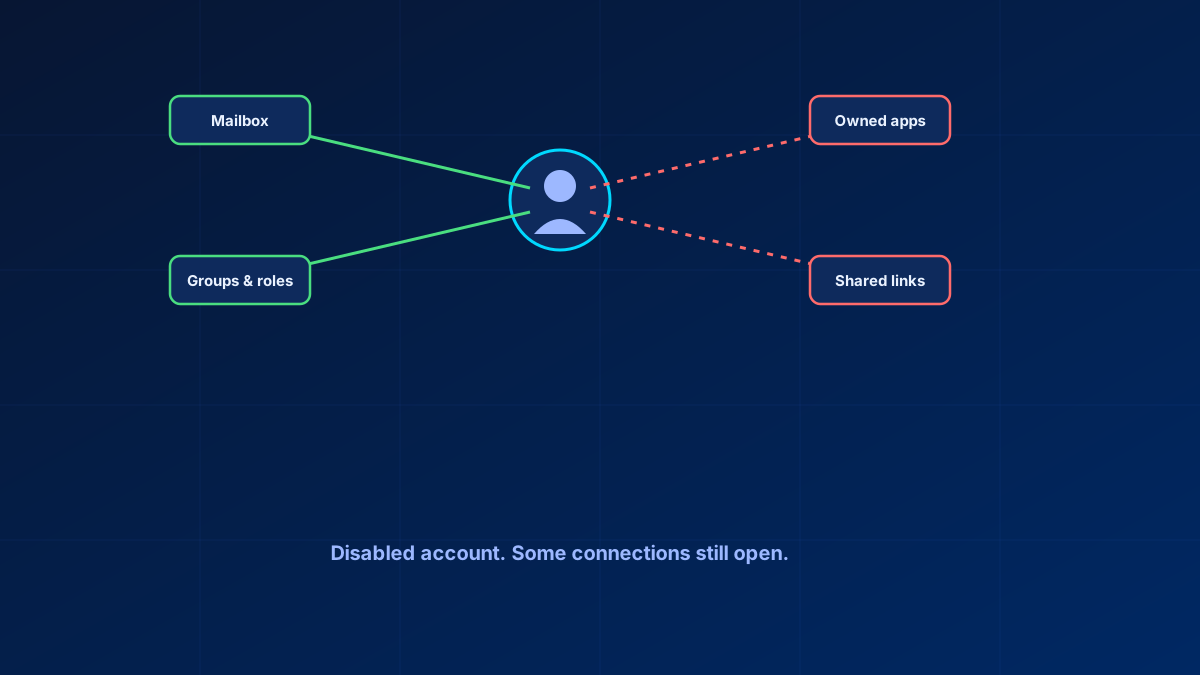
Ask a sysadmin how offboarding works in their tenant and the honest answer is usually some version of "a couple of scripts, and it is mostly reliable." Not fully reliable. Mostly. That qualifier is doing a lot of work.
Microsoft does document a standardised offboarding process. Remove a former employee and secure data walks through seven steps: block sign-in, save the mailbox contents, wipe and block the mobile device, forward the mail or convert the mailbox to shared, hand OneDrive and Outlook data to a successor, remove the licence, then delete the account. What that sequence does not cover is the part this article is about — resources the leaver owned, and access they granted to other people. Microsoft ships the account-centric half; the ownership half is still yours to build.
What it also ships is Entra ID Lifecycle Workflows — a genuinely automated joiner-mover-leaver engine — licensed through Microsoft Entra ID Governance or Entra Suite, which many SMB tenants do not have for this purpose alone. Everyone else runs scripts, and scripts are only as reliable as the person who wrote and maintained them.
In short
The gap between "mostly" and "fully" reliable is almost always the same two things: resources the leaver owned (app registrations, group ownership, flows) and access they granted to others (sharing links, delegates). Disabling the account is the easy part. Audit from the account outward with Graph queries periodically, regardless of what the offboarding script claims to have done.
Why automatic offboarding still needs written rules
Hands-off automation usually breaks the first time nobody has written the human rules down. A script that disables an account and strips group memberships is straightforward. What breaks it is the exception nobody coded for: the shared mailbox delegation, the guest access they granted a partner, the app registration where they are the only listed owner, the distribution list they solely manage. Automation handles the pattern. It does not handle the exception unless someone anticipated it.
What actually needs to happen, in order
A defensible sequence covers more ground than "disable the account":
- Block sign-in and revoke sessions first — this is the step that stops active access, though not instantly. An access token is good for about an hour, so a signed-out user can stay in a page they already have open until it expires. The documented delays differ by where you do it: the Exchange admin center or PowerShell lands within roughly 30 minutes, the Microsoft Entra admin center around 60, an on-premises change three hours or more through Entra Connect. Reset the password, run
Revoke-MgUserSignInSession, and in hybrid tenants make the change on-premises as well, or Entra Connect writes it back - Convert the mailbox to shared or set forwarding as the business requires. You can then drop the licence — but only if the mailbox is under 50 GB; above that it stays licensed. And do not delete the account afterwards: both a shared mailbox and a forwarding rule need the user object as an anchor, which is exactly the step a tidy-minded offboarding script tends to get wrong
- Transfer or reassign owned resources — OneDrive content, Teams and group ownership, app registrations they solely owned, Power Automate flows and Power Apps they built
- Remove group and role memberships, including PIM-eligible assignments, not just active ones
- Revoke access they granted to others — a departing employee's sharing links do not disappear when their account does
- Document what was found and removed, so the audit trail exists independently of anyone's memory six months later
Steps 3 and 5 are where scripted offboarding most often falls short, because they require enumerating what the user owned or shared, not just what they were a member of. That is a meaningfully harder query.
Auditing what a departed employee still has
If you are not confident the current process is complete, audit from the account outward rather than trusting the offboarding log:
- Query direct group and role membership via Graph (
/users/{id}/memberOf) and assess transitive or workload-specific access separately; it is not a complete entitlement view - Use
/users/{id}/ownedObjectsas one discovery input for app registrations, groups and other directory objects, then confirm a named successor owner for each critical resource - Review sign-in logs for activity after the offboarding date, which flags both process failures and, occasionally, credential misuse
- Review SharePoint and OneDrive sharing links through the relevant workload reports and owner process; link enumeration and revocation are not a single per-user Graph sweep
Access reviews: a control only if someone actually reviews
Access reviews exist to catch exactly the accumulation that offboarding gaps create. The recurring complaint is that managers asked to approve them click approve without checking, turning a governance control into a compliance artefact that proves a review happened rather than that anyone verified anything.
There are partial technical fixes for that, and most tenants have them switched off. Access reviews can hand the reviewer a recommendation instead of a blank decision: No sign-in within 30 days marks inactive users for denial and shows the last sign-in date, and User-to-Group Affiliation flags users who sit far from the rest of the group in the reporting structure. Justification required forces a written reason for every decision. And If reviewers don't respond, set to Remove access or Take recommendations, means silence removes access instead of preserving it — which turns the click-approve reflex into the expensive option. None of that makes a reviewer think, but it changes what happens when they do not. Beyond the settings, shorter review scopes still help — a specific resource, not "everything this person can touch" — and so does routing the review to someone closer to the resource than a general manager who does not know what the access is for.
What SMBs without Entra ID Governance can build
Lifecycle Workflows automate joiner-mover-leaver natively, but they require Microsoft Entra ID Governance or Entra Suite licensing, which puts them out of reach for many SMB tenants. The realistic alternative is a documented, versioned runbook — not a mental checklist — covering the six steps above, triggered by HR notification, with the audit queries run as a monthly spot-check against recent leavers rather than assumed to have worked. It is not automation. It is a process disciplined enough to behave like one.
Bottom line
"Mostly reliable" is an honest description of most offboarding processes, and not a status worth leaving alone. The gap is almost always owned resources and granted shares, not the basic disable step. Audit from the account outward periodically, regardless of how confident the script is meant to make you feel.
Glossary
- Lifecycle Workflows
- Entra ID Governance capability that automates joiner-mover-leaver tasks natively. Requires Microsoft Entra ID Governance or Microsoft Entra Suite licences. Microsoft 365 E5 and Entra ID P2 on their own do not include it; Microsoft 365 E7 does, because it carries the Entra Suite.
- Owned objects
- Directory objects where a user is listed as owner — app registrations, groups, Teams. These survive account disablement and are the most commonly missed offboarding item.
- Access review
- A scheduled attestation asking a reviewer to confirm whether specific access is still needed. How much of a control it is depends on the settings: decision helpers, required justification, and what happens when a reviewer does not respond.
- Session revocation
- Invalidating a user's existing refresh tokens so active sessions stop working at the next token request rather than persisting until natural expiry. The already-issued access token stays valid for up to an hour, so revocation is fast, not instant.
Frequently Asked Questions
How do I automate employee offboarding in Microsoft 365?
Entra ID Lifecycle Workflows automate the full joiner-mover-leaver process natively but require Microsoft Entra ID Governance or Entra Suite. Without it, a documented, versioned runbook covering sign-in block, mailbox conversion, resource transfer, group and role removal and shared-access revocation is the practical alternative.
What access does a departed employee still have in my tenant?
Check owned objects via Graph (/users/{id}/ownedObjects) for app registrations, groups and Teams they own, not just group memberships. Also review SharePoint and OneDrive sharing links they created, which persist independently of the account's disabled state.
Are Entra ID access reviews actually useful or just theatre?
They are as useful as the settings you enable. Turn on the decision helpers (No sign-in within 30 days, User-to-Group Affiliation), require a written justification, and set "If reviewers don't respond" to Remove access — then an unchecked review defaults to removal rather than renewal. Scoping reviews narrowly to a specific resource and routing them to someone close to that resource still improves the odds the decision is real.
How do I audit ex-employee access across Microsoft 365?
Query group and role membership plus owned objects via Microsoft Graph directly rather than trusting the offboarding log, check sign-in logs for post-departure activity, and review external sharing links the user created.
References
- Microsoft Learn: What are lifecycle workflows?
- Microsoft Learn: What are access reviews?
- Microsoft Graph: List ownedObjects
- Microsoft Learn: Remove a former employee and secure data
- Microsoft Learn: Convert a user mailbox to a shared mailbox
- Microsoft Learn: Review recommendations for access reviews
