
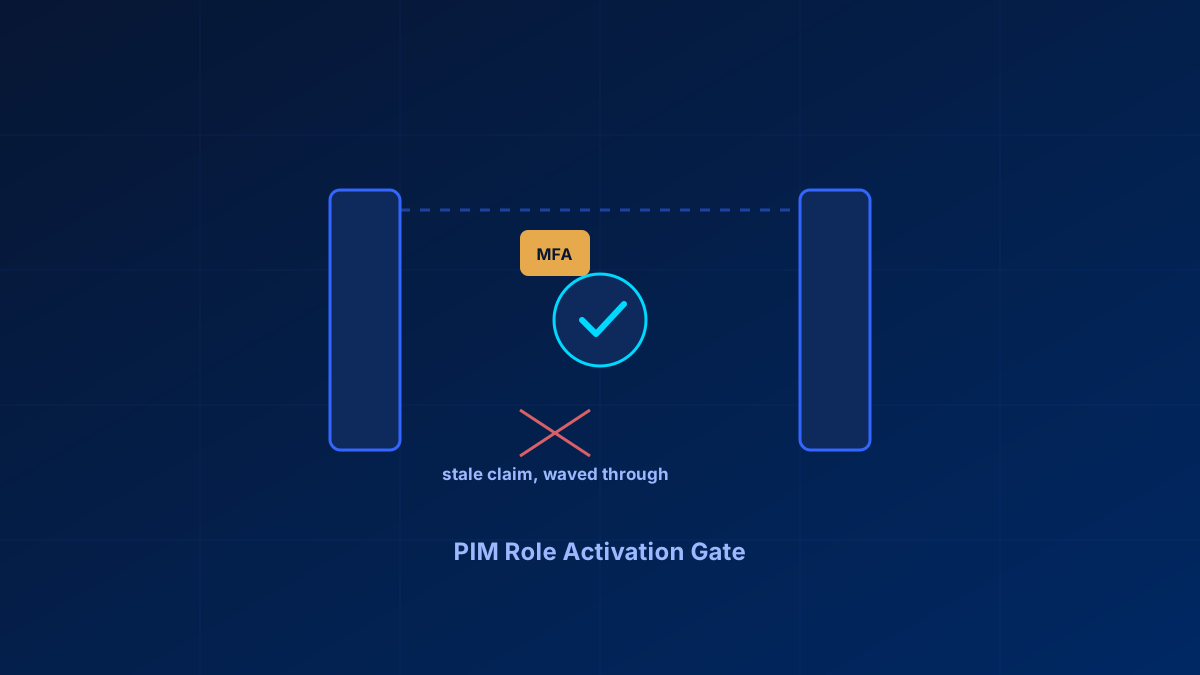
Privileged Identity Management is the right idea. Nobody should sit on Global Administrator around the clock, and time-bound, justified, logged role activation is how that gets fixed. Authentication context can attach a stricter Conditional Access requirement to activation, but its documented reauthentication windows and session behaviour mean admins must validate exactly what their own tenant prompts for and logs.
That gap gets flagged repeatedly, alongside a licensing question that usually gets answered wrong. PIM is not included below Entra ID P2, but it does not require moving to E5 either. Microsoft lists two valid licences for it: Entra ID P2, and Microsoft Entra ID Governance — an add-on whose only prerequisite is a product carrying the Entra ID P1 service plan, which Business Premium has. So a Business Premium tenant can reach PIM, and only for the users who hold eligible assignments, who approve activations, or who are covered by access reviews.
In short
PIM is the correct architecture for cutting standing privilege, but authentication context does not prove that every activation creates a fresh prompt. Microsoft documents a 10-minute reauthentication window and session-control caveats. Verify the behaviour in your own tenant before treating a prompt as evidence of a fresh phishing-resistant event. P1 alone has no PIM, but P1 is the prerequisite for the Entra ID Governance add-on that licenses it, per eligible user. If neither that add-on nor P2 fits the budget, the fallback is a disciplined manual role review, not nothing.
Why authentication context and PIM activation don't line up
Authentication context lets you attach a specific Conditional Access requirement — phishing-resistant MFA, a managed device, a specific location — to a sensitive action instead of an entire app. PIM role activation is a listed trigger for it. The requirement is real; the enforcement is narrower than the diagram, and Microsoft documents why in two places that never reference each other.
The first is a reauthentication window. The second is a known limitation that lets an authentication strength and a sign-in frequency be satisfied at two different moments. Together they mean a session carrying an authentication claim from earlier can activate a privileged role without a fresh prompt, even when the policy on paper demands one specific key.
That matters because the entire security case for PIM rests on activation being a deliberate, verified moment. If activation can happen on stale claims, the time-bound nature of the role stops being the control people think it is — a compromised session with an old token can still reach Global Administrator for the activation window.
Before rolling PIM out as your primary privileged-access control, verify the claim is actually re-evaluated at activation, not just checked against session state:
- Confirm the Conditional Access policy scoped to authentication context targets the PIM role activation trigger specifically, not just app sign-in
- Check the sign-in logs for the activation event and confirm which method satisfied the policy — and when that method was originally established
- Test with an account whose MFA claim is older than your session lifetime, and confirm re-authentication is actually required rather than silently waived
The 10-minute reauthentication window
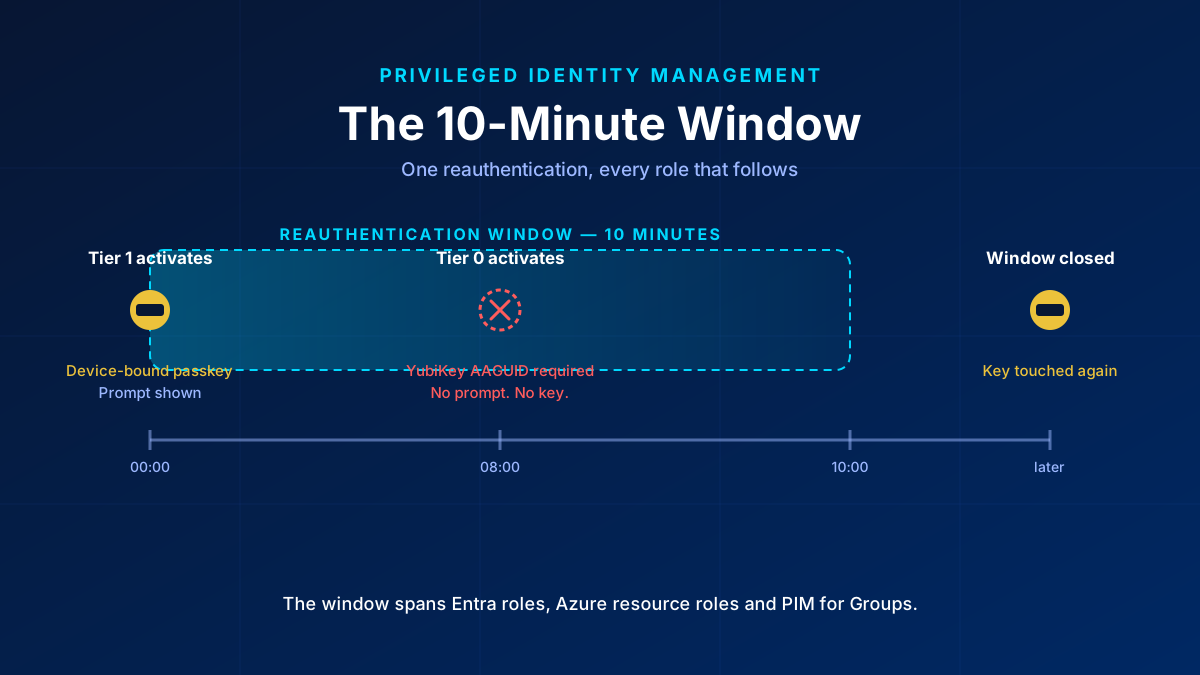
Microsoft Learn states it on the PIM role-settings page: when a user reauthenticates for one role activation, a 10-minute window applies, and activating another role inside that window does not prompt again. The scope is what makes it bite. The window is not per role and not per resource type. It spans Entra ID roles, Azure resource roles and PIM for Groups together.
Run it against a tiered admin model and the tiering thins out. Activate a lower-tier role with a device-bound passkey. Wait eight minutes. Activate a top-tier role whose custom authentication strength is restricted to one approved FIDO2 AAGUID. It opens, with no prompt and no key.
The instinctive fix is to set sign-in frequency to Every time on the Conditional Access policy behind the authentication context. It is still the right setting, and the tightest documented window available, but it does not do what the name suggests. Learn documents a clock-skew tolerance for it, and that tolerance is explicitly cross-policy:
The system accounts for five minutes of clock skew when every time is selected in policy, so users aren't prompted more often than once every five minutes. If the user completes MFA in the last 5 minutes and encounters another Conditional Access policy that requires reauthentication, we don't prompt the user.
So Every time means at most once every five minutes, across policies. Learn also describes it as forcing full reauthentication when the session is evaluated, and if no new token is requested, no evaluation happens. Whether the PIM timer runs before or after the Conditional Access evaluation is not documented, and the evaluation order decides the outcome.
The window itself is platform behaviour rather than policy. The Graph resource that models the authentication-context rule on a role policy exposes only claimValue, id, isEnabled and target. No timer to shorten, no flag to disable. The same resource confirms a role binds to exactly one context claim value, so you cannot stack two contexts on one role to force a second evaluation.
The worse of the two is filed as a known limitation. Learn's own example: a resource requires passkey (FIDO2) strength and a sign-in frequency of one hour. The user signed in with the passkey 24 hours ago, unlocks the device today with Windows Hello, and gets access, because in Microsoft's wording yesterday's sign-in satisfies the authentication strength requirement and today's device unlock satisfies the sign-in frequency requirement. Read against a hardware-key promise, that means the key can carry over from an old sign-in while the freshness comes from a Windows Hello unlock. Two satisfied conditions, nobody touched anything.
One thing worth knowing before building a control on either paragraph: the Every time recommendation and the 10-minute window appear verbatim in all three PIM role-settings articles — Entra roles, Azure resource roles and PIM for Groups. Three pages, one statement, and no precedence rule can be derived from three copies of the same sentence.
Three configuration and session behaviours to validate
Report-only is more dangerous here than no policy at all. If a tenant has no Conditional Access policy on the authentication context that PIM references, PIM falls back to requiring plain Entra MFA, a deliberate guard against misconfiguration. That fallback does not fire when the policy exists but is disabled, sits in report-only, or excludes the eligible users. In that state there is neither enforcement nor fallback, the activation runs through unchecked, and the portal shows a policy sitting exactly where it should be. A tenant still rolling out its Conditional Access catalogue is precisely where this bites.
One policy instead of two. The authentication context governs the activation. It says nothing about using the rights afterwards, so an admin can activate with the key and then exercise the elevated permissions from another session or device. The guidance is two policies: one scoped to the authentication context for activation, one scoped to the directory roles or admin persona for the use of the activated role. Ship only the first and the tier is hardened at the door and open at the desk.
Scoping a PIM for Groups policy to the group itself. The policy behind the authentication context must not target the group being activated, because during activation the user does not hold the membership yet, so the policy does not apply. Target the eligible users instead. Scoped to the group it has no effect, and it does not surface in testing, because the activation simply works.
What holds, and how to prove it
None of this makes the model pointless. It means the documented session behaviour must be part of the design and test plan. Keep Every time on the authentication-context policy, and write down that it means once every five minutes rather than every request. Add the second Conditional Access policy on the directory role or admin persona, with a custom authentication strength and an AAGUID allow-list. The built-in phishing-resistant strength also accepts Windows Hello for Business and certificate-based authentication, which is not the same control as one approved key model. Verify at rollout that both policies are enabled rather than in report-only or pilot, and that no eligible user sits in an exclusion group. Target eligible users with the auth-context policy, never the PIM group. Where you can, sequence activations so a top-tier elevation is not routinely preceded by a lower-tier one; process is a weak control, but it is the only lever over the window itself.
Then stop treating the activation prompt as evidence. The prompt tells you what Entra felt like asking for, and in the case that matters there is no prompt to observe. Pull the PIM audit event for the activation, take its timestamp and actor, and match it against the sign-in log entry for the same session. That entry carries the authentication method and the requirement actually satisfied. If the elevation carries no sign-in with the approved method inside the activation window, the key was not touched, regardless of what the design says.
If you alert on privileged activations with a scheduled query rule, budget the latency honestly. A five-minute evaluation frequency is a reasonable baseline, but the alert is only as fresh as the log underneath it. Microsoft documents that sign-in log latency depends on the path the data travels and on the target system, and that logs routed to a newly connected Log Analytics workspace can take up to three days to appear. Measure your own end-to-end latency once before you treat the alert as timely.
Two questions stayed open after a full pass through the documentation. Whether Every time forces an evaluation the PIM timer would otherwise skip is undocumented; the only Learn text tying session controls to authentication-context token issuance covers sign-in frequency by interval and leaves Every time unaddressed. Whether it prevents strength and frequency from decoupling is equally undocumented. The only empirical data point is a TechCommunity thread from January 2025 describing this exact setup, where the author reports the behaviour as unpredictable and browser-dependent, with observed windows of twenty minutes, an hour, and none at all. No Microsoft engineer replied. Forum evidence proves nothing, but it puts a question mark on the fixed 10-minute figure too.
PIM for service principals is a separate, immature story
Most PIM tooling assumes a human activating a role. Service principals and privileged service accounts need the same time-bound treatment, but there is no native "eligible" activation flow for a service principal the way there is for a user. Service principals with standing application permissions stay standing — exactly the persistence risk PIM was built to close for humans. It matters most where it is least covered: automation accounts holding Global Administrator or Application Administrator rights that run unattended.
What SMBs without P2 actually have
First check whether PIM is actually out of reach: the Microsoft Entra ID Governance add-on runs on top of P1 and licenses PIM per eligible user, so a Business Premium tenant has a path that does not involve E5. If that is not an option, the fallback is not "no governance" — it is manual governance done consistently. That means no standing Global Administrator assignments beyond the two emergency access accounts Microsoft recommends, a quarterly review of role assignments through the Entra admin center or the Graph roleManagement endpoints, and documented sign-off on who holds which privileged role and why. Slower, and dependent on someone actually doing it. But it is a real control, and better than assuming a licence you do not have is protecting you.
Automating activation without losing the record
The native activation UI is functional but slow for anyone elevating several times a day, which is why PowerShell automation around PIM keeps showing up in admin communities. Microsoft.Graph.Identity.Governance is the current module; the AzureADPreview PIM cmdlets are deprecated and should not be the basis of anything built now. Any automation wrapping activation should still write to the same audit trail PIM itself uses — the point is automating the click, not the logging.
For MSPs: PIM layered onto GDAP
MSPs increasingly put technicians into PIM-eligible roles scoped through GDAP rather than granting standing GDAP role assignments per customer. That is the right direction: it turns "this technician can always administer this customer" into "this technician can activate access for a bounded window, for a stated reason." The complexity is that it stacks PIM's activation gap on top of GDAP's own reliability issues, which are a separate write-up of their own — worth solving deliberately rather than assuming the stack works end to end because each piece is documented separately.
Bottom line
PIM is the correct architecture for reducing standing privilege, and the authentication context gap does not change that. It changes what you can claim it protects against. Verify the activation-time check actually fires before treating PIM as your defence against a compromised session — and if you are on P1, price the Entra ID Governance add-on before assuming PIM is out of reach.
Glossary
- PIM (Privileged Identity Management)
- Just-in-time, time-bound, approved and logged activation of privileged roles instead of standing assignment. Licensed through Entra ID P2 or through the Microsoft Entra ID Governance add-on, which only requires an Entra ID P1 product underneath.
- Authentication context
- A Conditional Access mechanism that attaches a stricter requirement (phishing-resistant MFA, compliant device) to a specific sensitive action rather than a whole application.
- Zero standing privilege
- The principle that no account holds privileged rights permanently — rights are activated for a bounded window and expire automatically.
- Break-glass account
- An excluded emergency-access account kept outside normal Conditional Access and PIM scope so a policy failure cannot lock everyone out.
- AAGUID
- The identifier of a FIDO2 authenticator model. An allow-list of AAGUIDs restricts sign-in to specific approved key models rather than to any attested key.
- Authentication strength
- A Conditional Access grant control naming the exact methods accepted. The built-in phishing-resistant strength accepts FIDO2, Windows Hello for Business and certificate-based authentication; a custom strength can narrow it to specific AAGUIDs.
- Sign-in frequency
- A Conditional Access session control defining how often a user must reauthenticate. Set to Every time, it carries a documented five-minute prompt tolerance that applies across policies.
- Service principal
- The identity an application or automation uses to authenticate. Standing application permissions on service principals are not covered by PIM's user-oriented activation flow.
Frequently Asked Questions
Is Entra ID PIM authentication context a known security gap?
Conditional Access policies scoped to authentication context are documented to trigger on PIM role activation, but two documented behaviours narrow the enforcement: a 10-minute reauthentication window that spans Entra roles, Azure resource roles and PIM for Groups, and a known limitation letting an authentication strength and a sign-in frequency be satisfied at different moments. Confirm the re-authentication behaviour in your own tenant before relying on it as a control.
Does PIM skip the authentication prompt for a second role activation?
Microsoft documents a 10-minute reauthentication window: after a user reauthenticates for one role activation, activating another role inside that window does not prompt again. The window spans Entra ID roles, Azure resource roles and PIM for Groups, so a lower-tier activation can open it for a higher-tier one.
Does sign-in frequency set to Every time override the PIM 10-minute window?
No documentation says it does. Every time carries its own documented five-minute clock-skew tolerance that applies across policies, and it forces reauthentication only when the session is actually evaluated. It remains the tightest available setting, but it is not a guarantee of a prompt at every activation.
Do I need Entra ID P2 for Privileged Identity Management?
Not necessarily as a full P2 seat. Microsoft lists two valid licences for PIM: Entra ID P2, which is included in Microsoft 365 E5, and Microsoft Entra ID Governance, an add-on whose only prerequisite is a product carrying the Entra ID P1 service plan — Microsoft 365 Business Premium qualifies. Licences are needed for the users who hold eligible or time-bound assignments, who approve activations, and who run or are covered by access reviews, not for the whole tenant. A Business Premium tenant can also pick up Entra ID P2 through the Microsoft Defender Suite for Business Premium add-on.
How do I automate PIM role activation with PowerShell?
Use the Microsoft.Graph.Identity.Governance module against the roleManagement/directory endpoints to request and approve eligible activations. Avoid the deprecated AzureADPreview PIM cmdlets — they are unmaintained and should not underpin new automation.
What can a P1 tenant do without PIM?
First check whether PIM is actually out of reach: the Microsoft Entra ID Governance add-on runs on top of P1 and licenses PIM per eligible user. If that is not an option, hard-limit standing Global Administrator assignments to the two emergency access accounts Microsoft recommends, and run a documented quarterly review of role assignments via the Entra admin center or Graph roleManagement queries. It is manual, but it is a real control.
References
- Microsoft Learn: What is Privileged Identity Management?
- Microsoft Learn: Conditional Access authentication context
- Microsoft Learn: Manage emergency access accounts
- Microsoft Learn: PIM role settings — the 10-minute reauthentication window
- Microsoft Learn: Authentication strengths — known limitations
- Microsoft Learn: Sign-in frequency and the five-minute prompt tolerance
