
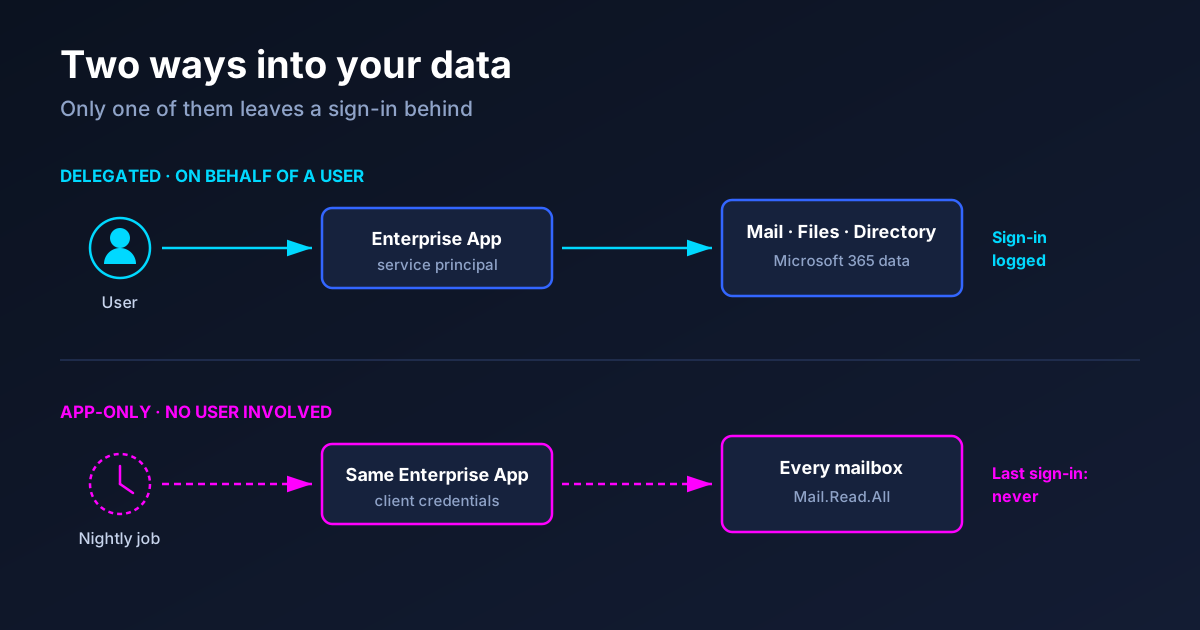
A customer wanted their Enterprise Apps cleaned up. 312 service principals, nobody could say what half of them did. We pulled the list, sorted by last sign-in, and marked everything with no sign-in in twelve months for deletion. Forty-one apps. It looked like a good afternoon's work.
One of those forty-one was the backup connector. It had never recorded a single sign-in, because no human had ever signed into it. Every night at two in the morning it authenticated with its own credentials and read every mailbox in the tenant. Deleting it would not have thrown an error in the portal. It would have thrown an error four weeks later, when someone needed a restore.
The sign-in column was not wrong. It was answering a different question than the one we were asking.
In short
Entra records two very different things under the umbrella of "sign-in": an app acting on behalf of a user (delegated), and an app acting as itself with client credentials (app-only). The blade you look at by default mostly shows you the first kind. An app that never appears there can still be moving data continuously. The beta endpoint servicePrincipalSignInActivities separates the two, and that separation is the difference between a safe cleanup and an outage.
Two kinds of "used"
When a user opens an app and consents to it reading their calendar, the app requests a token on that user's behalf. That is a delegated flow, and it produces exactly what you expect: a sign-in event with a username attached, visible in the sign-in logs, filterable, obvious.
When a daemon, a sync job or a backup tool authenticates with a client secret or certificate, there is no user in the transaction at all. The app presents its own credentials and receives a token scoped to application permissions — Mail.Read.All, Files.Read.All, Directory.Read.All. Those tokens are the ones that matter most from a blast-radius perspective, because they are not limited to one person's mailbox. They are limited to nothing.
Both are recorded. They are just recorded as different sign-in event types, and the default view of the sign-in logs does not put them side by side. So the mental model most of us carry — "no sign-in means nobody uses it" — quietly maps onto only half the picture.
Getting the data out of Graph
The endpoint that makes this tractable is in beta:
GET https://graph.microsoft.com/beta/reports/servicePrincipalSignInActivitiesPer service principal it returns several timestamps rather than one. The names are long, and the distinction is the entire point:
| Field | What it actually means |
|---|---|
delegatedClientSignInActivity | The app requested a token on behalf of a user. The classic login. |
applicationAuthenticationClientSignInActivity | The app authenticated as itself. Daemon, sync, backup — the invisible traffic. |
delegatedResourceSignInActivity | The app was the resource another app requested access to on a user's behalf. |
applicationAuthenticationResourceSignInActivity | The app was the resource in an app-only, app-to-app token flow. |
lastSignInActivity | The most recent of any of them. Useful as a rollup, useless as a decision input on its own. |
An app whose delegatedClientSignInActivity is empty and whose applicationAuthenticationClientSignInActivity is from last night is not unused. It is unattended, which is a different word and a different risk.
Two constraints before you build anything on this. It needs Entra ID P1 or P2. Free tenants do get sign-in logs in the portal — seven days of them — but the Graph sign-in activity APIs and the Usage & insights reports, including this one, are premium-only, so on a Free tenant the whole approach collapses to guesswork. And it is a beta endpoint: the shape can change, so check the response against your own tenant rather than trusting any blog post, including this one.
Read scopes are modest — AuditLog.Read.All for the activity data, Application.Read.All and Directory.Read.All to resolve permissions, owners and consent grants alongside it. For delegated access the signed-in user also needs Reports Reader, Security Reader or Security Administrator. Nothing here needs write access, which makes it an easy conversation with a nervous customer.
If you want the raw events instead of the rollup, the sign-in log itself will filter by event type:
GET https://graph.microsoft.com/beta/auditLogs/signIns
    ?$filter=signInEventTypes/any(t: t eq 'servicePrincipal')
Bear in mind the retention: seven days on Entra ID Free, thirty days with P1 or P2. "Unused for twelve months" is not a statement the sign-in log can support. It is a statement the activity report can support, which is exactly why the report exists.
Usage alone is not a decision
Knowing an app is idle does not tell you what to do with it. Pair usage with the severity of what it is allowed to touch, and the list sorts itself into four groups with genuinely different answers:
| High permissions | Low permissions | |
|---|---|---|
| In use | Critical. Needs a named owner and a documented purpose, today. | Fine. Revisit on schedule. |
| Idle | Remove. A dormant app holding Mail.ReadWrite.All is a credential waiting to be found. | Housekeeping. Low urgency, low risk. |
The top-left box is where the surprises live. In that same tenant, the app with the widest permissions was a five-year-old integration for a ticketing system that had been replaced twice since. It still worked. It still had Directory.ReadWrite.All. Nobody had thought about it since the person who set it up left.
Two more signals belong in the same view. Consent type tells you whether an admin deliberately approved the app or a user clicked through a consent prompt — user consent at scale is how shadow IT and illicit consent attacks look from the inside. And credential expiry, because a secret that expires next month will take an integration down whether or not anyone is watching that app.
The column Graph will never have
Everything above is a machine fact. You can pull it fresh whenever you like, and it will always be current.
Then there is the other half: who owns this app, what business process depends on it, what did we decide about it last time, and when do we look again. Graph does not have those fields, because they are not properties of the tenant. They are properties of a conversation. The owners collection helps only when someone bothered to fill it in, and in most tenants I open it is empty for the apps that matter most.
This is why an app inventory that is only a report does not change anything. You run it, you feel briefly informed, and six months later you run it again from zero. The decisions from last time are gone. The value is not in the list — it is in the diff between this list and the last one: three new apps, one permission escalation, two apps that stopped being used since the last review.
What I am building around this
I have been putting this together as a browser-based tool rather than another service to host. It signs in with your own account, reads what it needs through Graph, and never sends tenant data anywhere else — nothing to deploy, nothing to trust with your data beyond the browser tab it runs in.
Two design decisions matter more than the feature list. Human knowledge — owner, business purpose, decision, review date — is carried in an exportable file that you re-import next time, so a review compares against the previous one instead of starting over. And where AI helps translate a wall of permission scopes into a sentence a department head can act on, it runs on your own API key, not mine, so the tenant data path stays yours.
It is not finished and I am not taking sign-ups yet. If you want to try the query above against your own tenant in the meantime, I would genuinely like to hear how many apps in the idle-but-privileged box you end up with. My number was eleven, in a tenant that had been "cleaned up" the year before.
Frequently asked questions
Does this work without Entra ID P1?
No. Querying service principal sign-in activity through Graph requires P1 or P2. Without it you can still enumerate apps, permissions, owners and consent grants, but you cannot reliably tell a dormant app from a busy one, which removes the part that makes cleanup safe.
Is the beta endpoint safe to rely on?
For analysis, yes. For anything automated that deletes things, treat it as a signal and not as an authority — beta contracts change without much notice, and a wrong answer here has an outage attached.
Why not just use the built-in recommendation for unused apps?
Use it — it is a reasonable starting point. It gives you a list at a point in time. What it does not do is carry your decisions forward, distinguish the two usage types explicitly in the same view, or tell you who agreed to keep an app last quarter.
What about apps with no owner at all?
Treat a missing owner as a finding rather than a formality. An app nobody claims, holding permissions nobody reviews, is the exact configuration attackers look for after an initial compromise — it survives password resets and it rarely gets noticed.
Where to start
Pull servicePrincipalSignInActivities once against a tenant you know well and sort by the app-only timestamp. If a name shows up there that you cannot immediately explain, you have found the reason this matters — before the cleanup, rather than after it.
