
In short
Microsoft documents a 10-minute reauthentication window in Privileged Identity Management: once a user reauthenticates for one role activation, further activations inside that window do not prompt again. The window spans Entra roles, Azure resource roles and PIM for Groups. Microsoft recommends setting sign-in frequency to Every time to force reauthentication at each activation, but does not document that it overrides the window, and that setting carries its own five-minute prompt tolerance. A separate known issue lets authentication strength and sign-in frequency be satisfied at two different moments. If your tiered admin design promises a hardware key at every Tier 0 elevation, that promise stays a target until you test it in your own tenant and read the audit log instead of the prompt.
The Sentence in the Design Document
Almost every tiered admin design I have read in the last two years contains a variation of the same line: the hardware key is touched at every elevation, without exception. Tier 0 gets a physical FIDO2 key with an attested AAGUID on an allow-list, Tier 1 gets a device-bound passkey, Tier 2 gets whatever the Authenticator offers. Clean model, easy to explain to an auditor, easy to draw on a slide.
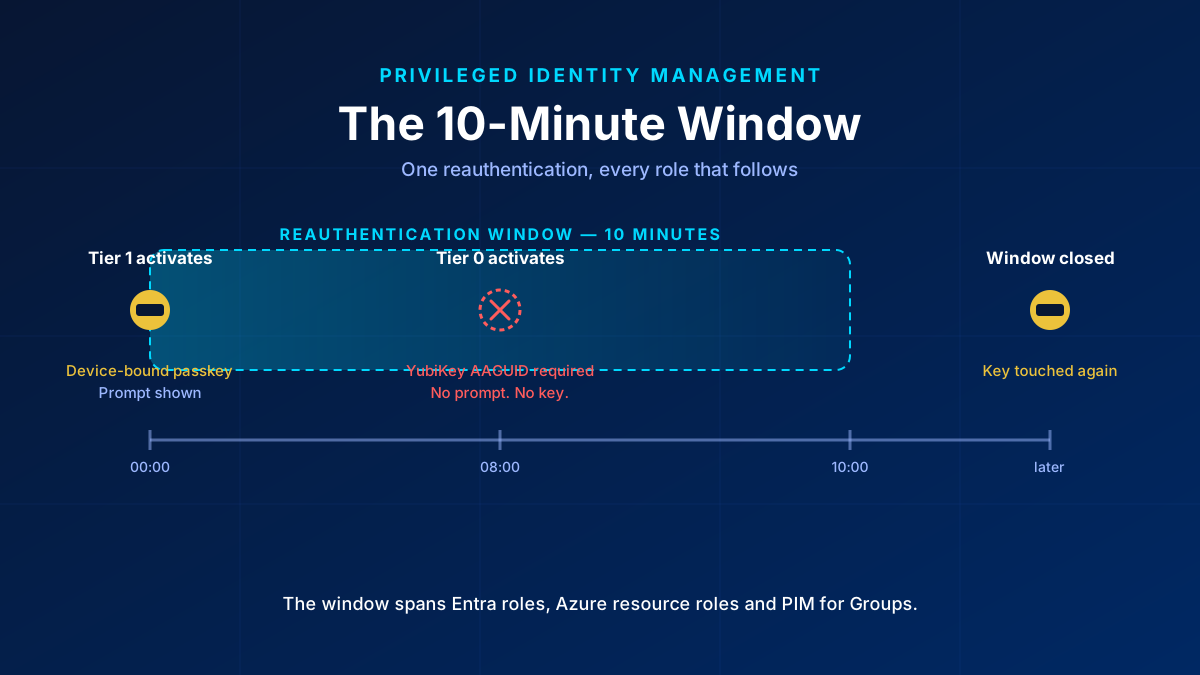
Now take two activations back to back. Activate a Tier 1 role with a device-bound passkey. Wait eight minutes. Activate a Tier 0 role that a custom authentication strength restricts to one specific YubiKey AAGUID. Microsoft’s documentation says a second activation inside the 10-minute window does not prompt again. Whether the key is still demanded is what the rest of this article tries to pin down.
The model is not wrong on paper. It is under-enforced in the platform, and the two Microsoft pages that explain why never reference each other.
What the 10-Minute Window Actually Does
Microsoft Learn states it plainly on the PIM role-settings page: when a user reauthenticates for one role activation, a 10-minute window applies, and activating another role inside that window does not trigger another authentication prompt. The wording matters less than the scope. The window is not per role and not per resource type. It spans Entra ID roles, Azure resource roles and PIM for Groups together.
That is the whole mechanism. A Tier 1 activation is a full, legitimate reauthentication. It opens the window. Every activation that lands in the next ten minutes inherits it, including the one you carefully wrapped in an AAGUID allow-list.
Two things follow that are easy to miss. First, the window is platform behaviour that no policy setting controls. The Graph resource that models the authentication-context rule on a role policy exposes claimValue, id, isEnabled and target. There is no timer to shorten, no flag to disable. Second, the same Graph resource confirms that a role binds to exactly one authentication-context claim value, so you cannot stack two contexts on one role to force a second evaluation.
Why “Every Time” Does Not Close It
The instinctive fix is to set sign-in frequency to Every time on the Conditional Access policy that backs the authentication context. It is still the right setting, and the tightest documented window available, but it does not do what its name suggests.
Learn documents a clock-skew tolerance for Every time, and it is explicitly cross-policy:
The system accounts for five minutes of clock skew when every time is selected in policy, so users aren't prompted more often than once every five minutes. If the user completes MFA in the last 5 minutes and encounters another Conditional Access policy that requires reauthentication, we don't prompt the user.
So Every time means at most once every five minutes, across policies. That alone puts an eight-minute gap out of reach on the 10-minute window and inside reach on nothing useful.
The second half is subtler. Learn describes the setting as requiring full reauthentication when the session is evaluated. If no new token is requested, no evaluation happens, and a policy that never evaluates never prompts. Whether the PIM timer runs before or after the Conditional Access evaluation is not documented anywhere I could find, and the evaluation order decides the outcome: under a token model the device-bound passkey fails the AAGUID-restricted strength and the prompt appears; if the timer wins, no token is requested at all.
One more piece of context worth knowing before you build a control on either paragraph. Both the Every time recommendation and the 10-minute window entered the documentation in a single Copilot-co-authored commit to the Entra docs repository on 27 March 2026, which inserted them into all three PIM articles at once. Three pages, one statement. You cannot derive a precedence rule from three copies of the same sentence.
The Worse One: Strength and Freshness Can Come From Different Moments
The window is the problem people notice. This one is filed as a known limitation and does more damage.
Learn's own example: a resource requires passkey (FIDO2) strength and a sign-in frequency of one hour. The user signed in with the passkey 24 hours ago. Today they unlock the device with Windows Hello and get access, because, in Microsoft's wording, yesterday's sign-in satisfies the authentication strength requirement and today's device unlock satisfies the sign-in frequency requirement.
Read that against a Tier 0 promise. The YubiKey can carry over from an old sign-in while the freshness comes from a Windows Hello unlock this morning. Two green checkmarks in the evaluation, nobody touched the key. Whether Every time prevents the two conditions from decoupling is not documented either way — the known issue is written generically and neither includes nor excludes it.
Until someone tests that in a real tenant, “without exception” belongs in the target-state column of your design until a test moves it into the evidence column.
Three Ways the Enforcement Silently Does Not Apply
Report-only is more dangerous here than no policy at all. If a tenant has no Conditional Access policy at all on the authentication context that PIM references, PIM falls back to requiring plain Entra MFA. That fallback is a deliberate guard against misconfiguration — and it does not fire when the policy exists but is disabled, sits in report-only, or excludes the eligible users. In that state you get neither enforcement nor fallback, the activation runs through unchecked, and the portal shows a policy sitting right where it should be. A tiered design that is still rolling out its Conditional Access catalogue is exactly the situation where this bites.
One policy instead of two. The authentication context governs the activation. It says nothing about using the rights afterwards. A Tier 0 admin can activate with the hardware key and then exercise the elevated permissions from a different session or a different device entirely. Microsoft's guidance is two policies: one scoped to the authentication context for activation, one scoped to the directory roles or the admin persona for the use of the activated role. Ship only the first and the tier is half enforced — hardened at the door, open at the desk.
Scoping a PIM for Groups policy to the group itself. This one fails quietly in the worst way. The Conditional Access policy backing the authentication context must not target the group being activated, because during activation the user does not hold the membership yet, so the policy does not apply. Target the eligible users instead. Scoped to the group, the policy has no effect — and it does not show up in testing, because the activation simply works.
What Holds Until the Docs Reconcile
None of this makes the tiered model pointless. It makes the enforcement narrower than the diagram, so build for the narrower version:
- Keep Every time on the authentication-context policy. It is still the tightest documented setting, as long as you write down that it means once every five minutes rather than every request.
- Add the second Conditional Access policy on the directory role or admin persona, with the custom authentication strength and the AAGUID allow-list. The built-in phishing-resistant MFA strength also accepts Windows Hello for Business and certificate-based authentication, which is not the same control as one approved key model.
- Verify at instantiation that both policies are enabled, not in report-only, not in pilot, and that no eligible user sits in an exclusion group.
- Target eligible users with the auth-context policy, never the PIM group.
- Sequence privileged activations so that a Tier 0 elevation is not routinely preceded by a lower-tier one. Process is a weak control, but it is the only lever you have over the window itself.
For the surrounding groundwork — Conditional Access as the policy engine, PIM as just-in-time elevation — the identity pillar of the Zero Trust series covers the baseline this article sits on top of.
Prove It Instead of Assuming It
Stop treating the activation prompt as evidence. The prompt tells you what Entra felt like asking for. It does not tell you which method was actually presented, and in the case that matters there is no prompt to observe at all.
The correlation that answers the question: pull the PIM audit event for the activation, take its timestamp and the actor, and match it against the sign-in log entry for the same session. The sign-in log carries the authentication method and the authentication requirement that were actually satisfied. If the Tier 0 activation carries no sign-in with the approved AAGUID inside the activation window, the key was not touched, regardless of what the design document says.
If you monitor Tier 0 activations with a scheduled query rule against the sign-in and audit logs, budget for the latency honestly. A five-minute evaluation frequency is a reasonable process baseline, but end-to-end latency from sign-in to alert also includes the log path behind the rule, so measure it in your own tenant before you promise a response time. Near-real-time detection needs an event-hub or analytics-rule path and should be costed separately rather than assumed.
What Is Still Unproven
Two questions stayed open after a full pass through the documentation, and I would rather name them than paper over them.
Whether Every time forces an evaluation that the PIM timer would otherwise skip is undocumented; the only Learn text that ties session controls to authentication-context token issuance covers sign-in frequency by interval and leaves Every time unaddressed. Whether Every time prevents strength and frequency from being satisfied at different moments is equally undocumented.
The only empirical data point I could find is a TechCommunity thread from January 2025 describing a closely related setup with PIM for Groups. The author reports the behaviour as unpredictable and browser-dependent, with follow-up activations usually going through without a prompt, and observed windows of twenty minutes, an hour, and none at all. No Microsoft engineer replied. That is forum evidence, so it proves nothing, but it does put a question mark on the fixed 10-minute figure too, not only on whether Every time overrides it.
Both belong in a lab before they reach a design review. If you have run tiered activations back to back against an AAGUID-restricted strength, the interesting result is not whether it worked. It is what the sign-in log said afterwards.
Glossary
- AAGUID
- The identifier of a FIDO2 authenticator model. An allow-list of AAGUIDs restricts sign-in to specific approved key models rather than to any attested key.
- Authentication context
- A labelled claim value that PIM can require at role activation and that a Conditional Access policy can target, so activation carries its own access requirements.
- Authentication strength
- A Conditional Access grant control that names the exact authentication methods accepted. The built-in phishing-resistant strength accepts FIDO2, Windows Hello for Business and certificate-based authentication; a custom strength can narrow it to specific AAGUIDs.
- Device-bound passkey
- A passkey tied to one device, not exportable or synchronised. It differs from a Tier 0 hardware key mainly in that no hardware attestation is enforced.
- PIM for Groups
- Just-in-time activation of membership or ownership in a group, rather than of a directory role. It shares the reauthentication window with Entra and Azure resource roles.
- Sign-in frequency
- A Conditional Access session control that defines how often a user must reauthenticate. Set to Every time, it carries a documented five-minute prompt tolerance across policies.
- Tiered admin model
- Splitting privileged roles into tiers by blast radius, with stricter authentication and process requirements at the highest tier.
Frequently Asked Questions
Does PIM really skip the authentication prompt for a second role activation?
Microsoft documents a 10-minute reauthentication window: after a user reauthenticates for one role activation, activating another role inside that window does not prompt again. The window spans Entra ID roles, Azure resource roles and PIM for Groups, so a lower-tier activation can open it for a higher-tier one.
Does sign-in frequency set to Every time override the PIM 10-minute window?
Microsoft recommends it for that purpose but does not document that it overrides the window. Every time also carries its own documented five-minute clock-skew tolerance that applies across policies, and it forces reauthentication only when the session is actually evaluated. It remains the tightest available setting, but it is not a guarantee of a prompt at every activation.
How do I prove a hardware key was actually used for a Tier 0 elevation?
Correlate the PIM audit event for the activation with the sign-in log entry for the same session and check which authentication method and requirement were satisfied. The activation prompt is not evidence — in the case that matters, no prompt appears at all.
