
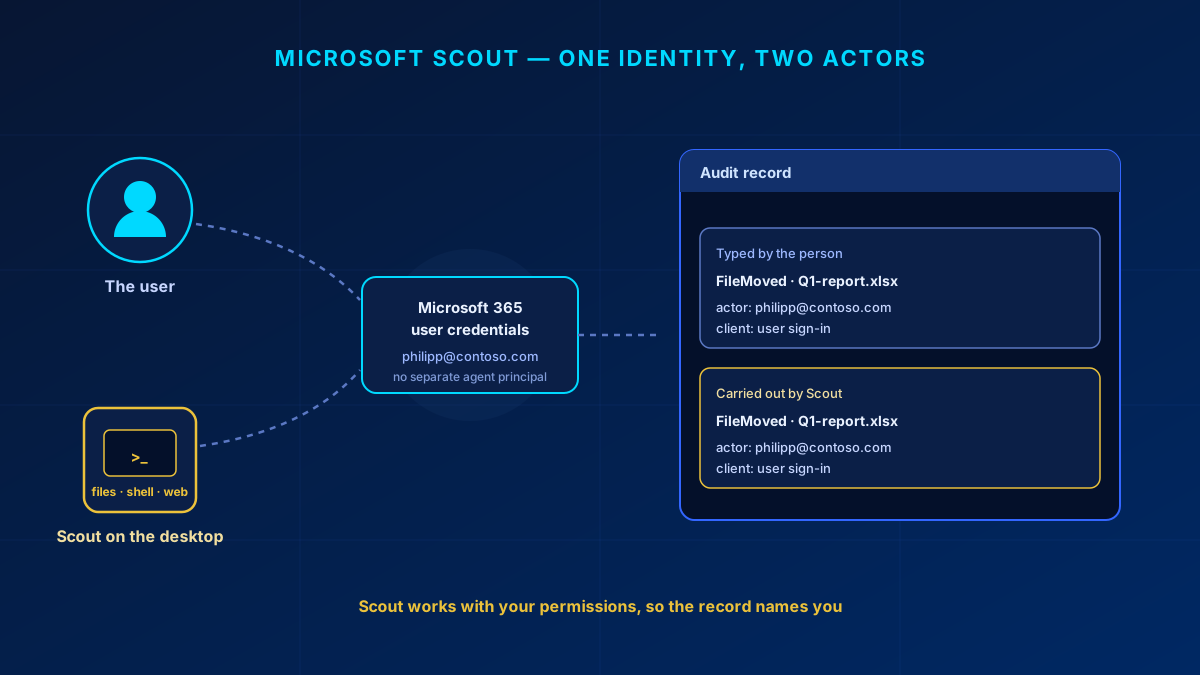
Every conversation about Microsoft Scout ends at the same question: which identity does it act as? That answer decides what your Conditional Access policies can see, what the audit record says, and who carries the consequence when the agent moves the wrong folder.
Microsoft answers it in one sentence. Scout "uses your existing Microsoft 365 credentials and operates with the same permissions and access controls that apply to your account." There is no agent principal in your directory. Per-agent identities do exist in Microsoft's stack, but they belong to Microsoft Agent 365 — a different product, with its own licence.
In short
Scout is a preview desktop app, reachable only through the Frontier program, that works on your files, shell, browser and Microsoft 365 data. It has no identity of its own: it signs in as the user and inherits that account's permissions, so its actions are recorded as the user's. Model calls run through GitHub Copilot, where data residency, retention, label enforcement and eDiscovery stop applying.
What Scout actually is
A desktop application for Windows 11 and macOS 12 or later. Inside a workspace directory you pick, it reads and writes files, runs shell commands, automates a browser, and queries Microsoft 365 through WorkIQ — sending mail, managing inbox rules, sharing OneDrive and SharePoint files with named people. It also runs unattended, on heartbeat check-ins and scheduled automations.
Two constraints frame everything. Scout is a preview feature, and Microsoft states that preview features may never reach general availability. It is also unavailable in US Government clouds (GCC, GCC High, DoD) and in sovereign and national clouds.
The identity model, and what it costs you
The Responsible AI FAQ is explicit: Scout uses your existing Microsoft 365 credentials, works with the permissions that apply to your account, and reaches only what that account may reach. Four consequences follow, and they are the whole security story.
- Nothing to point a policy at. Conditional Access, Identity Protection and PIM all need a principal, and here the principal is the human. You can tighten the user's sign-in; no rule can treat Scout differently from the person in front of it.
- Attribution collapses. An inbox rule, a file shared with a colleague, a sent mail — Scout does all three — carry the user's identity. Nothing in the documented model marks them as agent actions.
- Permissions are the blast radius. An over-permissioned user hands Scout everything they can reach in one sign-in. Run it under an account with standing admin roles and the agent inherits those too.
- Lifecycle is the account's lifecycle. You stop Scout by disabling the user's account and removing their GitHub Copilot seat; there is no agent object to switch off.
Compare an agent identity Microsoft actually built. In Agent 365 each agent is an Entra service principal with servicePrincipalType set to ServiceIdentity: a sponsor, its own permissions, its own sign-in and audit logs, Conditional Access applying to it directly. That is the model people assume Scout has, and it needs an Agent 365 licence — included in Microsoft 365 E7, otherwise an add-on to E5, A5 or Business Premium.
The practical rules are dull. Sign in with an ordinary working account, never one holding standing admin roles — that is what PIM and a separate admin account are for. And clean up that account's permissions first, because the agent finds every share the user forgot.
Where the data goes
The local work happens on your machine; the thinking does not. Model interactions are processed through GitHub Copilot under separate terms, and prompts and content may be transmitted outside Microsoft 365, including to third-party model providers. Microsoft names what stops applying there: data residency commitments, retention policies, sensitivity labeling enforcement, eDiscovery, and other compliance controls. For a tenant with a residency obligation, that ends the discussion.
Storage splits in a way that is easy to miss. Session and memory data land in the user's OneDrive, inside your tenant, covered by the Microsoft DPA and your Purview configuration. Automation instructions and tool output stay on the device and are not covered by the Microsoft 365 DPA at all.
None of this is hidden. It is why Frontier sign-up includes a separate attestation form: admins opt in explicitly because Scout routes data to third-party inference paths.
What you can actually control
Two admin gates, both required before anyone signs in. Gate one turns on Copilot Frontier in the Microsoft 365 admin center under Copilot, then Settings; allow about three hours to propagate. Gate two is the Scout Intune policy, the Frontier attestation form, and GitHub Copilot Business or Enterprise seats. Installing the app grants nothing, and a missing gate fails sign-in without a clear reason. One trap: an assigned Copilot seat is not enough, the GitHub Copilot app policy must be enabled at enterprise and organization level too.
Device controls are ADMX and ADML templates imported into Intune from the microsoft/scout-resources repository, with a microsoft-scout.mobileconfig profile on the device channel for macOS. They live under HKLM\SOFTWARE\Policies\Scout, so standard users cannot change them. A template still saying "Clawpilot" is the pre-release internal name. A conservative start, using documented values:
HKLM\SOFTWARE\Policies\Scout

ForcePrompt          REG_DWORD  1    ; approve every non-read action
RestrictToWorkspace  REG_DWORD  1    ; files and shell stay in workspace
DisableHeartbeat     REG_DWORD  1    ; no background check-ins
DisableWorkflows     REG_DWORD  1    ; no automations
DisabledPermissions  REG_SZ     shell,mcp
Loosen from there. DisabledServers blocks whole tool servers (filesystem, playwright, WorkIQ), BrowserEgressBlockedOrigins takes origins the browser may not reach, DisabledProviders narrows the model catalogue. Keep heartbeat off longest: actions that would normally prompt are skipped there, not queued for you.
Useful today, and not
Scout earns its keep where work is local, single-user and reviewable before anything leaves the machine: build and test loops in a code workspace, turning a folder of raw material into a document, browser chores against an internal portal. With auto-approve off and the workspace restriction on, that is a reasonable pilot.
It is the wrong tool where attribution or data boundaries matter: anything you must trace to an agent rather than a person, anything under a residency commitment, unattended automations that send mail or touch production, any account with admin roles attached. Today the answer to "who did this" names a user who may have been at lunch. What is worth waiting for is the Agent 365 identity work reaching products like this one.
What an agent under your users' identities could reach today is a permissions question, and it has an answer. Let's look at it together.
Correction, September 2026: an earlier version of this article said Scout assigns a dedicated Entra identity to each agent, and praised that as its strength. That is wrong — per-agent identities belong to Microsoft Agent 365. Rewritten around the documented model.
Frequently Asked Questions
Does Microsoft Scout have its own Entra ID identity?
No. Microsoft documents that Scout uses your existing Microsoft 365 credentials and the permissions that apply to your account. There is no agent principal in the directory, so nothing to scope a Conditional Access policy to and nothing to disable separately from the user. Per-agent Entra identities belong to Microsoft Agent 365.
What has to be licensed and enabled before users can sign in?
Per user: an active Microsoft 365 Copilot licence, a GitHub Copilot Business or Enterprise seat, and a GitHub account. Per tenant: Copilot Frontier switched on, the Scout Intune policy assigned, and the Frontier attestation form filed. Missing any of those blocks sign-in without a clear message. Microsoft Learn publishes no prices, so check the vendors' own pricing pages.
Can I tell from the audit record what Scout did and what the user did?
Not from the documented model. Scout acts with the signed-in user's credentials, so its actions carry that user's identity, and Microsoft documents no separate agent principal or Scout-specific audit surface. Per-agent sign-in and audit logs are an Entra Agent ID capability.
